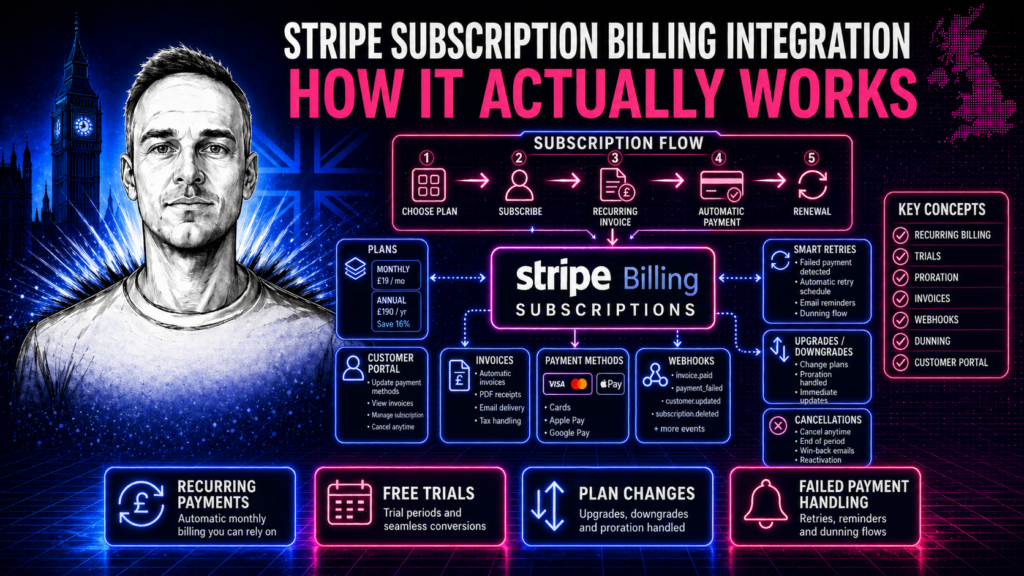
Stripe’s subscription API is genuinely powerful — but it has a learning curve that trips up developers who approach it as a simple recurring payment system. The concepts are specific, the edge cases are many, and getting subscription logic right matters because the consequences of getting it wrong hit your customers directly: wrong charges, access granted when it shouldn’t be, access revoked when it should still be active.
This post is a thorough walkthrough of how Stripe subscription billing actually works, what the key concepts are, and what a properly built subscription integration looks like in practice.
The core Stripe billing model
Understanding Stripe subscriptions requires understanding four objects and how they relate: Products, Prices, Customers and Subscriptions.
A Product is what you’re selling — “Pro Plan”, “Starter Tier”, “Enterprise Access”. Products are containers for Prices. They hold the name and description; the billing logic lives on the Price.
A Price defines the billing amount, currency, interval (monthly, annual, weekly, daily) and type (recurring or one-time). One Product can have multiple Prices — £29/month and £290/year for the same product, for example. When a subscription is created, it’s attached to a specific Price, not just a Product.
A Customer is the Stripe record for your user — name, email, default payment method, and the collection of their subscriptions, invoices and payment history. Creating a Customer in Stripe before creating a subscription is required. The Customer object is what ties all Stripe activity to a specific user in your system.
A Subscription connects a Customer to one or more Prices. It drives the billing cycle — Stripe automatically generates invoices, attempts payment, and fires webhook events based on the outcome. The subscription has a status that reflects its current state, and that status is the single source of truth for whether a customer should have access.
This is the key mental model shift: your system should model subscription state, not payment state. A customer’s access is determined by their current subscription status. The payment is a consequence of the subscription state — not the other way around.
Subscription statuses and what they mean for access
trialing — the customer is in a free trial period. No payment has been collected and no payment method may be on file. Access should be granted. The trial end date is on the subscription object as trial_end. When the trial ends, Stripe attempts the first payment and the subscription transitions to active or past_due.
active — the subscription is current and payments are succeeding. Full access. This is the steady state you want all paying customers in.
past_due — a payment has failed but Stripe hasn’t given up. Smart Retries are running. Depending on your business policy, you might continue granting access during a grace period or restrict access immediately. The invoice object on the subscription has the next scheduled retry time. A customer in past_due has had a payment fail but their subscription is still technically active — this is an important distinction from canceled.
unpaid — payment has failed repeatedly and Stripe has stopped retrying. This status is reached when the subscription’s payment collection behaviour is set to mark_uncollectible after retries are exhausted. Access should typically be suspended at this point.
canceled — the subscription has ended, either by cancellation, by automatic cancellation after unpaid status, or by reaching an cancel_at date you set. Access revoked.
incomplete — the subscription was created but the initial payment requires action (3D Secure authentication, for example) or failed immediately. The subscription isn’t active yet. No access should be granted. If the payment isn’t completed within 23 hours, Stripe transitions the subscription to incomplete_expired and the subscription is closed automatically.
incomplete_expired — the subscription was created, the initial payment was never completed, and the window has closed. Treat as if the subscription never existed.
Creating subscriptions correctly
The subscription creation flow has two parts: creating the Stripe subscription via the API, and then confirming the outcome via webhook.
The API call creates the subscription and returns the subscription object, including its initial status. If the initial payment succeeds immediately (most cards in test mode, and many in production), the status comes back as active. If it requires 3D Secure authentication, the status comes back as incomplete and the response includes a Payment Intent with a requires_action status.
For SCA-compliant flows (required in the EU and UK), the subscription creation must be paired with Stripe.js on the frontend to handle the 3D Secure challenge. The flow is: create subscription server-side, return the Payment Intent client secret to the frontend, use stripe.confirmCardPayment() to handle authentication, listen for the payment_intent.succeeded webhook to confirm the subscription is active.
Don’t rely on the API response alone to determine whether a subscription is active. The webhook is the confirmation. The API response tells you the subscription was created; the webhook tells you whether it actually succeeded.
Trials, upgrades and downgrades
Trial periods in Stripe are set on the subscription at creation using the trial_period_days parameter or a trial_end timestamp. The customer.subscription.trial_will_end webhook fires three days before trial end — a reliable trigger for conversion emails (“Your trial ends in 3 days”). At trial end, Stripe attempts the first payment and transitions the subscription accordingly.
Requiring a payment method upfront for trials is optional but recommended for SaaS products — it dramatically reduces friction at the point of conversion and eliminates the step where a customer who wants to continue has to add their card. Configure this by setting up the subscription with a trial and collecting card details at signup even though you won’t charge them immediately.
Upgrades and downgrades are handled by updating the subscription’s items via subscriptions.update() with new price IDs. The key decision is proration: how to handle the unused portion of the current billing period and the partial period on the new plan.
Stripe offers several proration modes: create_prorations (default — generates proration credits and charges immediately), none (no proration, change takes effect at next renewal), and always_invoice (immediately generates an invoice for the proration amount). The right choice depends on your business model. Immediate upgrades with proration are common for SaaS. Downgrades at period end (no immediate proration) are common for situations where you don’t want to issue credits.
The customer.subscription.updated webhook event fires on any subscription change. Your handler needs to read the previous_attributes field to understand what specifically changed. A plan change, a trial ending, a cancellation scheduled, a quantity change — all fire the same event. Checking previous_attributes tells you what was different before this update.
Failed payment handling and dunning
Stripe’s Smart Retries use machine learning to retry failed subscription payments at times statistically likely to succeed. The default retry schedule is determined by Stripe; you can also configure a custom schedule in the Stripe Dashboard under Billing settings.
Retries alone are not a complete dunning strategy. A customer whose payment is failing may not know it’s failing — their card may have expired, their bank may have issued a new card number, or they may have a temporary insufficient funds situation. Proactive communication significantly improves recovery rates.
A typical dunning sequence: email immediately on first failure (“Your payment failed — please update your payment method”), follow-up after 3 days if the card still hasn’t been updated, a final notice before access is suspended. Each email should link directly to your Stripe Customer Portal or a payment method update page.
The invoice.payment_failed webhook triggers your dunning flow. The invoice.payment_succeeded event on a previously failed invoice tells you the customer has resolved the issue — cancel any pending access restrictions and send a confirmation.
The Stripe Customer Portal handles card updates, subscription cancellations and invoice history without any custom UI required on your part. Stripe hosts it; you generate a portal session link via the API and redirect the customer. Embedding a “Manage billing” link in your product that opens the portal covers 90% of customer billing self-service without building anything.
Cancellation handling
Cancellation in Stripe has two modes: immediate cancellation (subscription ends now, customer loses access now) and end-of-period cancellation (subscription continues until the current billing period ends, then cancels).
End-of-period cancellation is the customer-friendly default for most SaaS products — the customer has paid for the current period and should retain access until it ends. Set this by updating the subscription with cancel_at_period_end: true. The subscription status remains active with a flag indicating pending cancellation. Access continues. When the period ends, Stripe transitions the subscription to canceled and fires the customer.subscription.deleted event — that’s when you revoke access.
Allowing customers to un-cancel — reactivating a subscription that was set to cancel at period end but hasn’t canceled yet — is a one-line API call: update the subscription with cancel_at_period_end: false. Worth implementing; it recovers customers who changed their minds.
Metered and usage-based billing
Stripe supports usage-based billing where the invoice amount varies based on consumption reported during the billing period. You create a price with usage_type: metered, and then report usage during the billing period via the subscriptionItems.createUsageRecord() API. At the end of the period, Stripe invoices for the usage reported.
Usage-based billing adds meaningful complexity: you need to report usage accurately in real time (or aggregate and report on a schedule), display current usage to customers within your product, handle overage scenarios, and model the edge cases around partial periods and proration. It’s a meaningfully different build from flat-rate subscription billing and should be scoped and quoted as such.
Testing subscription billing
Stripe provides test card numbers that trigger specific scenarios: cards that succeed, cards that decline, cards that require 3D Secure, cards that trigger insufficient funds. The test clock feature lets you fast-forward time in test mode — create a subscription with a trial, advance the test clock to trial end, and watch the payment attempt fire and the subscription transition to active or past_due without waiting for the trial to actually expire. Essential for testing subscription lifecycle flows without waiting weeks.
For a complete overview of what a Stripe subscription integration costs to build, see the Stripe API integration cost post. For the webhook handling that subscription billing depends on, see Stripe webhook integration. You can watch live Stripe events — including subscription events — in the webhook event viewer demo. For the full service, see the Stripe API integration service.
Related posts
Need a custom integration built?
I build custom API integrations — Stripe, Companies House and bespoke data pipelines. Reliable, well-documented, no agency overhead.
Discuss your project →