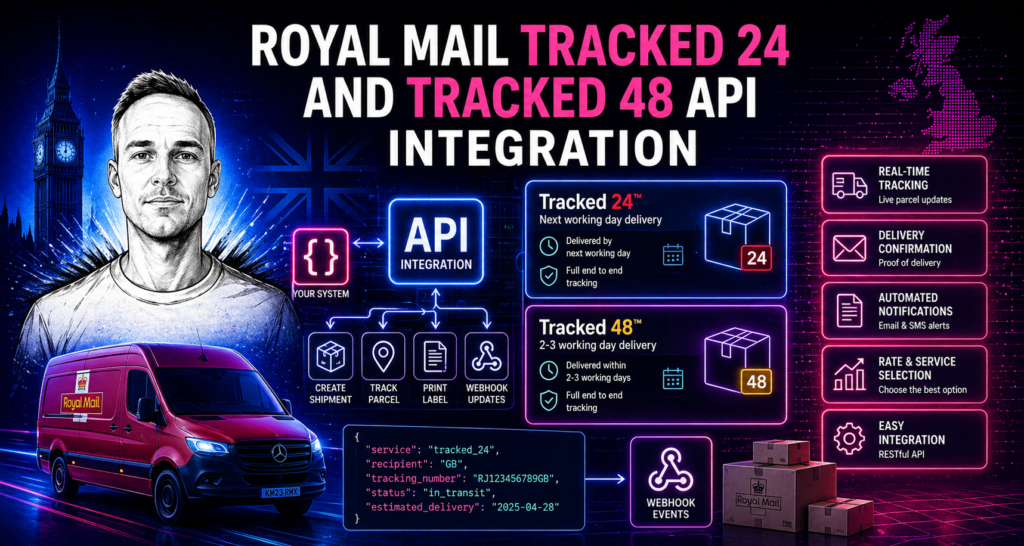
Royal Mail Tracked 24 and Tracked 48 are the two core tracked services for parcel despatch — next-day and two-day delivery respectively, both with full barcode scanning events throughout the delivery journey. For most UK ecommerce businesses, one or both of these services handles the majority of their shipment volume. Integrating them via the Royal Mail API automates the entire despatch process: service selection, label generation, tracking capture and customer notification. This post covers how the API handles these services, how automatic service selection works, and how tracking events flow through to your system.
Tracked 24 vs Tracked 48: what the API returns
Both Tracked 24 and Tracked 48 return the same data structure from the Royal Mail API — the difference is in the service code passed when creating the shipment, and the resulting delivery timeline and postage cost. At the API level, you select the service by specifying the service code: TRM24 for Tracked 24 and TRM48 for Tracked 48 (with variations for large letters and parcels). Everything else about how the shipment is created is identical.
When a shipment is created via the API, Royal Mail returns: a tracking number in the standard 2D barcode format; a label in your specified format (PDF or ZPL for thermal printers); and a shipment ID for referencing the record. For Tracked services, the tracking number is scannable at every stage of the delivery journey — collection from your premises, at the mail centre, out for delivery, and at the point of delivery or attempted delivery.
Automatic service selection between Tracked 24 and Tracked 48
One of the most valuable aspects of a custom Royal Mail API integration is automating the choice between Tracked 24 and Tracked 48. Manually selecting the right service for each order is time-consuming and error-prone — an order that should have gone Tracked 24 sent as Tracked 48 is a customer complaint waiting to happen; an order sent Tracked 24 when Tracked 48 would have sufficed is unnecessary postage cost.
The integration implements your service selection rules once and applies them to every order automatically. Common selection patterns:
Checkout-driven selection. The most reliable approach: customers choose standard or express delivery at checkout. Standard maps to Tracked 48, express maps to Tracked 24. The service the customer paid for is the service that ships — no manual matching required.
Order value thresholds. Orders over a defined value automatically use Tracked 24 for faster delivery and better customer experience on high-value purchases. Orders under the threshold use Tracked 48. This is a simple rule to implement and can meaningfully reduce customer queries about high-value orders.
Weight and size based. Different weight bands can map to different services. A large, heavy parcel might always ship Tracked 48 regardless of what the customer selected, if same-day Tracked 24 collection isn’t available for that weight class at your collection point. The integration handles these edge cases automatically.
Cut-off time based. Orders placed before 1pm use Tracked 24 for next-day delivery. Orders placed after 1pm use Tracked 48 since next-day collection isn’t possible. This rule runs automatically based on the order timestamp — no-one has to decide whether an order “made the cut”.
Product category based. Certain product categories might always ship on a specific service — fragile items on Tracked 24 for a shorter transit time; subscription boxes always on Tracked 48 for cost efficiency. The integration reads the order items and selects the service accordingly.
Tracked 24 with Signature
Both Tracked 24 and Tracked 48 are available with an optional signature-on-delivery add-on. This is relevant for high-value orders where proof of delivery is important. The service code changes (TRM24S for Tracked 24 Signature), and the label includes the signature requirement indicator. The integration can apply the signature add-on automatically based on order value, product type or customer request — the same rule-based approach as the standard service selection.
Tracking event handling
Royal Mail’s tracking API returns a chronological list of scan events for each tracking number: accepted at post office, processed at mail centre, out for delivery, delivered, attempted delivery (with failure reason) and so on. These events update in real time as the parcel moves through the network.
A well-built integration uses these events in several ways:
Customer-facing tracking. The tracking events can be pulled into your order tracking page, giving customers a live view of their parcel’s progress without having to visit the Royal Mail tracking website. This keeps customers on your site and reduces “where is my order” queries to customer service.
Automated customer updates. Key tracking events — particularly “out for delivery” — can trigger automated email or SMS notifications to the customer. A customer who receives an “out for delivery today” email has one less reason to contact your customer service team.
Failed delivery handling. When a delivery is attempted but fails — no-one home, address access issue, parcel too large — the tracking event flags this. Your integration can detect failed delivery attempts and trigger a customer notification automatically, prompting them to arrange a redelivery or collect from their local depot before the parcel is returned to you.
Returns monitoring. Parcels that are scanned as returned to sender appear in the tracking data. Your integration can detect these events and trigger a returns workflow — updating the order status, notifying customer service, and beginning your returns process automatically.
Tracked 48 Large Letter vs Tracked 48 Parcel
Royal Mail distinguishes between letter formats and parcel formats for pricing purposes. A Tracked 48 shipment that meets the large letter dimensions (up to 353mm x 250mm x 25mm, up to 750g) is significantly cheaper than a Tracked 48 Parcel. The API uses different service codes for each format.
A custom integration can automatically determine the correct format based on package dimensions and weight. This is one of the most common sources of postage overspend in manual or plugin-based despatch: selecting Tracked 48 Parcel for something that qualifies as a Tracked 48 Large Letter and paying significantly more than necessary. Automating the format selection based on product dimensions and order composition removes this overspend entirely.
For the full Royal Mail API integration service and pricing, see the Royal Mail API integration service. For what the integration costs, see the cost guide. For WooCommerce automation, see how to automate Royal Mail labels on WooCommerce. For a complete overview of all Royal Mail API products, see the Royal Mail API integration guide.
Special Delivery and high-value shipment handling
Tracked 24 and Tracked 48 are the right services for the majority of ecommerce shipments, but they’re not the right choice for everything. For high-value shipments — jewellery, electronics, luxury goods, business documents — Royal Mail Special Delivery Guaranteed provides next-day delivery by 1pm or 9am, proof of delivery with signature, and compensation up to £750 (or up to £2,500 with an add-on). The API integration handles Special Delivery with the same service selection logic as Tracked 24 and Tracked 48 — you define the threshold (order value, product category, or both) and the integration applies it automatically.
Special Delivery labels are generated in the same way as Tracked labels — same API call, different service code. The resulting label includes the Special Delivery indicators that tell Royal Mail’s network to handle the parcel with priority processing. For businesses sending occasional high-value items alongside standard stock, automatic service selection between Tracked and Special Delivery based on order value is one of the most straightforward rules to implement and one of the most operationally valuable.
International Tracked services via the API
Royal Mail’s international tracked services — International Tracked, International Tracked & Signed, International Signed — are available through the same API, with additional data requirements for customs compliance. For EU-bound shipments, IOSS numbers must be included for orders under €150. For commercial shipments, EORI numbers and commodity codes are required. The integration reads this data from your order management system and includes it automatically in the shipment creation request.
Service selection for international orders can be destination-based: USA and Canada use International Tracked; EU destinations use International Tracked with IOSS; rest of world uses International Tracked & Signed for higher-value items. The rules are configured once and apply automatically to all international orders without anyone having to look up which service applies to which country.
Related posts
- Royal Mail API integration: a complete guide
- Royal Mail Click & Drop API: how it works
- How to automate Royal Mail labels on WooCommerce
- Royal Mail API integration cost
If you need help with a custom API integration for your website or business application, I can help. I build bespoke API integrations for UK businesses. See API integration pricing or get in touch to discuss your project.
Need a custom integration built?
I build custom API integrations — Stripe, Companies House and bespoke data pipelines. Reliable, well-documented, no agency overhead.
Discuss your project →