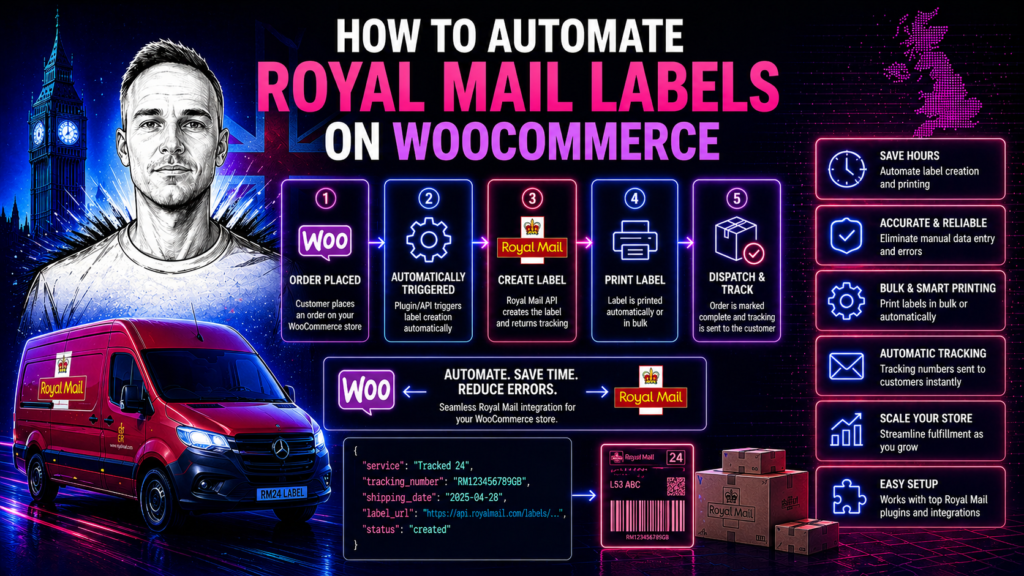
Manually processing Royal Mail despatch on WooCommerce is one of those jobs that doesn’t feel slow until you add it up. Log into Click & Drop, import the orders, check the weights, select the services, print the labels, submit the manifest before the collection. On a quiet day it takes 20 minutes. On a busy day it takes an hour or more, requires concentration, and is easy to get wrong. Automating it removes the entire process — labels generate and print automatically when an order is placed, and the manifest submits on a schedule. This post covers how that works and what it takes to build.
Why manual WooCommerce despatch processing is a problem
The manual process has several failure points that automation eliminates. Wrong service selected because someone didn’t notice the package weight crept over a threshold. Manifest missed because the person who normally does it was off sick. Tracking number not sent to the customer because nobody remembered to copy it across. Labels printed for yesterday’s orders instead of today’s because the CSV export wasn’t filtered correctly.
Each of these happens occasionally in any manual process. When it happens, it costs time to fix, occasionally costs money on redeliveries or upgrades, and sometimes results in a customer complaint. At low volumes, manual processing is tolerable. As volumes grow, the error rate grows with it and the time cost becomes a meaningful operational overhead.
Automation doesn’t make errors impossible — it makes the specific class of errors caused by manual processing impossible. Once the integration is configured, service selection is always correct because it follows the rules you defined, not what someone decided in a hurry at 8am.
How the integration connects WooCommerce to Royal Mail
The integration sits between WooCommerce and the Royal Mail Click & Drop API. When an order is placed on WooCommerce and reaches a configured status (typically “Processing” or a custom despatch-ready status), a webhook fires and the integration takes over.
The integration reads the order from WooCommerce — recipient name, address, order items, weight, declared value — and makes an API call to Click & Drop to create the shipment. Click & Drop validates the address, creates a shipment record, and returns a tracking number and label data. The integration writes the tracking number back to the WooCommerce order, routes the label to your printer queue, and updates the order status to “Shipped” or whatever post-despatch status you use. WooCommerce then sends your configured despatch notification email to the customer, with the tracking number included.
The whole flow from order placed to label printed takes a few seconds. Nobody has to do anything.
Service selection logic
The most valuable part of a custom WooCommerce Royal Mail integration — compared to a plugin — is custom service selection. Instead of manually choosing a service for each order or setting a single default service, the integration selects the right service automatically based on rules you define.
Common service selection rules for WooCommerce stores:
Weight-based selection. Orders under 100g use Second Class Letter. Orders 100g–750g use Second Class Large Letter. Orders 750g–1kg use Tracked 48. Orders over 1kg use Tracked 48 Parcel. This eliminates the most common cause of postage overspend — using a parcel service for something that qualifies as a large letter.
Value-based selection. Orders over £75 automatically use Special Delivery for next-day guaranteed delivery with signature and up to £750 compensation. Orders under £75 use a standard tracked service. This protects high-value shipments without requiring a manual decision at despatch.
Delivery speed selection. Orders placed with a next-day shipping option use Tracked 24. Orders on standard shipping use Tracked 48. The service is driven by what the customer chose at checkout, not by what someone selected manually.
Destination-based selection. UK mainland orders use one set of services. Scottish Highlands, Northern Ireland, Channel Islands and international destinations each get the appropriate service for that destination, including the correct international service for international orders.
These rules are configured once and run automatically on every order. When your service requirements change — new service tier introduced, weight threshold adjusted — you update the rule in one place and it applies to all future orders immediately.
Label printing automation
For high-volume despatch, automatic label printing is as important as automatic label generation. The integration can route labels directly to a configured printer without any manual steps — no downloading PDFs, no clicking print, no selecting the printer.
For thermal label printers (Zebra ZPL, Dymo, BIXOLON and similar), the integration requests labels in ZPL format from Click & Drop and sends them directly to the printer via TCP/IP. Labels print automatically the moment a shipment is created. For standard laser or inkjet printers, PDF labels are generated and can be auto-printed or batched to a print queue for bulk printing.
On a high-volume despatch day, a warehouse team can work through a packing list knowing that labels will be ready at the printer in the order they’re needed, without anyone having to manually trigger each one.
Tracking number write-back and customer notification
The tracking number from each Click & Drop shipment is written back to the WooCommerce order automatically. It appears in the order detail in WooCommerce admin, is available to your customer service team, and — if you’re using WooCommerce’s built-in order emails or an email plugin — can be included in the despatch notification email sent to the customer.
A clean tracking number write-back eliminates one of the most common customer service queries: “Do you have a tracking number for my order?” When tracking is included automatically in the despatch email, customers can track their own orders without contacting you.
Manifest submission
Royal Mail requires an end-of-day manifest to be submitted before your daily collection. The manifest is a summary of all shipments from that day. If it’s not submitted, Royal Mail doesn’t have a record of your shipments, which can cause processing delays.
The integration submits the manifest automatically at a configured time — typically 30 minutes before your collection window, to ensure all same-day shipments are included. If you have multiple collection windows, the integration can be configured to submit a partial manifest before each one. No manual steps required, no risk of a missed manifest on a busy day.
Plugin vs custom integration for WooCommerce
WooCommerce Royal Mail plugins exist and work for simple requirements. If you need basic Click & Drop connectivity with a single service and no custom rules, a plugin might be sufficient. The limitations become apparent when you need anything beyond that.
Plugins can’t implement custom service selection logic beyond basic weight bands. They don’t support automatic manifest submission on a schedule. They don’t integrate with separate OMS or warehouse systems. They’re dependent on the plugin developer maintaining compatibility with WooCommerce updates — a WooCommerce major version update breaking your shipping plugin is a real operational risk.
A custom integration is code you own, documented and tested against your specific setup. When WooCommerce releases an update, you update your integration on your schedule, not waiting for a plugin developer to release a compatible version. When Royal Mail changes their API, the fix is made in your codebase directly.
For full service details and pricing, see the Royal Mail API integration service. For what the integration costs, see the Royal Mail API integration cost guide. For the Click & Drop API specifically, see how the Click & Drop API works.
Returns and reverse logistics
Automating outbound despatch is the primary use case for a Royal Mail API integration, but the same infrastructure can handle returns. Royal Mail’s Returns API lets you generate pre-paid returns labels — these can be included in the outbound parcel, emailed to the customer on request, or generated automatically when a return is initiated through your returns portal.
A returns label integration works in reverse: instead of your warehouse address being the sender, it’s the destination. The customer’s address is the sender. The label format and service are configured for your returns service — typically Tracked 48 or Special Delivery depending on the value of goods being returned.
Connecting outbound and returns in a single integration gives you a complete view of your Royal Mail activity in one place. Returns can be tracked in the same system as outbound shipments, and refunds or exchanges can be triggered automatically when a return tracking event indicates the parcel has been received at your warehouse.
Error handling and order recovery
A production Royal Mail integration on WooCommerce will encounter failed shipment creation at some point. The most common causes: the order address has a typo that fails Royal Mail’s address validation; a product weight isn’t set in WooCommerce and the integration can’t calculate the total shipment weight; the Click & Drop API is temporarily unavailable and the request times out.
The integration needs a defined strategy for each failure type. Address validation failures should flag the WooCommerce order with a custom status and send an internal notification so someone can correct the address and re-trigger the shipment. Missing weight should trigger a product data alert. API unavailability should trigger automatic retries with exponential backoff, and escalate to a manual fallback if retries are exhausted.
Without explicit error handling, failed shipment creation silently leaves orders unshipped. With it, every failure is visible, actionable and recoverable. The difference between a well-built integration and a fragile one is almost always in the error handling — not the happy path, which is straightforward.
Related posts
- Royal Mail API integration: a complete guide
- Royal Mail Click & Drop API: how it works
- Royal Mail API integration cost
- Royal Mail Tracked 24 and Tracked 48 API integration
If you need help with a custom API integration for your website or business application, I can help. I build bespoke API integrations for UK businesses. See API integration pricing or get in touch to discuss your project.
Need a custom integration built?
I build custom API integrations — Stripe, Companies House and bespoke data pipelines. Reliable, well-documented, no agency overhead.
Discuss your project →